
Fewer duplicates, more context
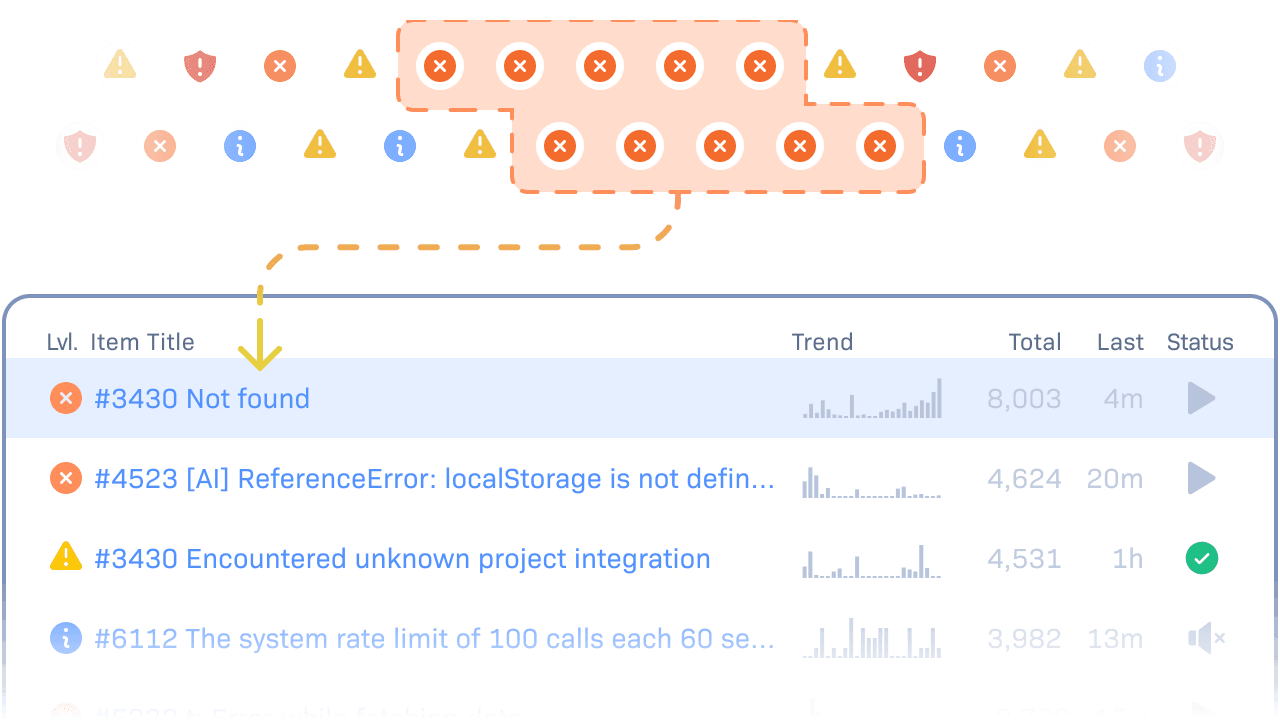
A bug that fires a thousand times is still one bug.
Rollbar groups errors by stack trace and message, so a thousand overnight occurrences are one item with a count of the people affected. You see what is new, recurring, or resolved.
Every item shows the line of code, the deploy, and who last touched it. One item gets one analysis and one pull request, however often it fires.
Root cause and fix
Ask Rollbar why. It
reads your code before it answers.
Start an analysis from any item, or let a rule start it. The result lands on the item.

Click once on the item, or write a rule that starts it when a matching error arrives.


It reads the stack trace, the telemetry timeline, and your code.

It is written on the item. If Rollbar cannot tell, it says so.

Resolve runs your tests in isolation and opens a pull request. Or hand the error to your own agent through our MCP server.

Agent automation
Write the rule once, and the analysis is running before anyone opens the item.
Pick an environment and a level, then choose analysis only or a pull request too. Start with analysis on production, and add pull requests once you trust what it finds.
Trends
Watch the line drop after the fix ships.
Spot a regression early and see how many people it reaches. Deploy tracking marks every release on the graph, so you see the occurrences stop.
Saved views and Rollbar Query Language (RQL).
Frontend and backend errors on one timeline.
Telemetry on every occurrence.

Alerts and integrations
You decide who hears about what,
and where.
Choose which errors alert, who hears about them, and whether it lands in Slack, Teams, email, PagerDuty, or a webhook. Finished analyses and new pull requests can land there too.
Know before your users do
Real-time alerts reach your team while the impact is still small.

Collaborate with context
GitHub, GitLab, or Bitbucket show the commit, deploy, and developer behind each error.
Turn errors into action
Send errors to Jira, Linear, Asana, Trello, or other trackers with their context attached.

Build your own connection
Webhooks and the Rollbar API connect your internal tools.
Two billion errors a month, and your alert still lands in
under three seconds.
from occurrence to alert
errors processed each month
across environments
and ISO 27001 certified
Get started
Your next production error can arrive with
the fix attached.
Plans start at $0, with a 14-day free trial.